Quantumlink Gateway + tapdo fleet
Every radio in one box. Every box in one fleet.
The Quantumlink Gateway takes LTE, LoRa, GNSS, UWB, Bluetooth and Zigbee, Thread or Matter as plug-in cards. tapdo fleet runs its apps, OS updates, logs and remote shell, whether you have ten gateways or a thousand.
- 3 Mini PCIe + 2 M.2
- DC, PoE+ or USB-C power
- Designed in Münster
- Hosted in Frankfurt
The gateway
One box, built around the radios you need
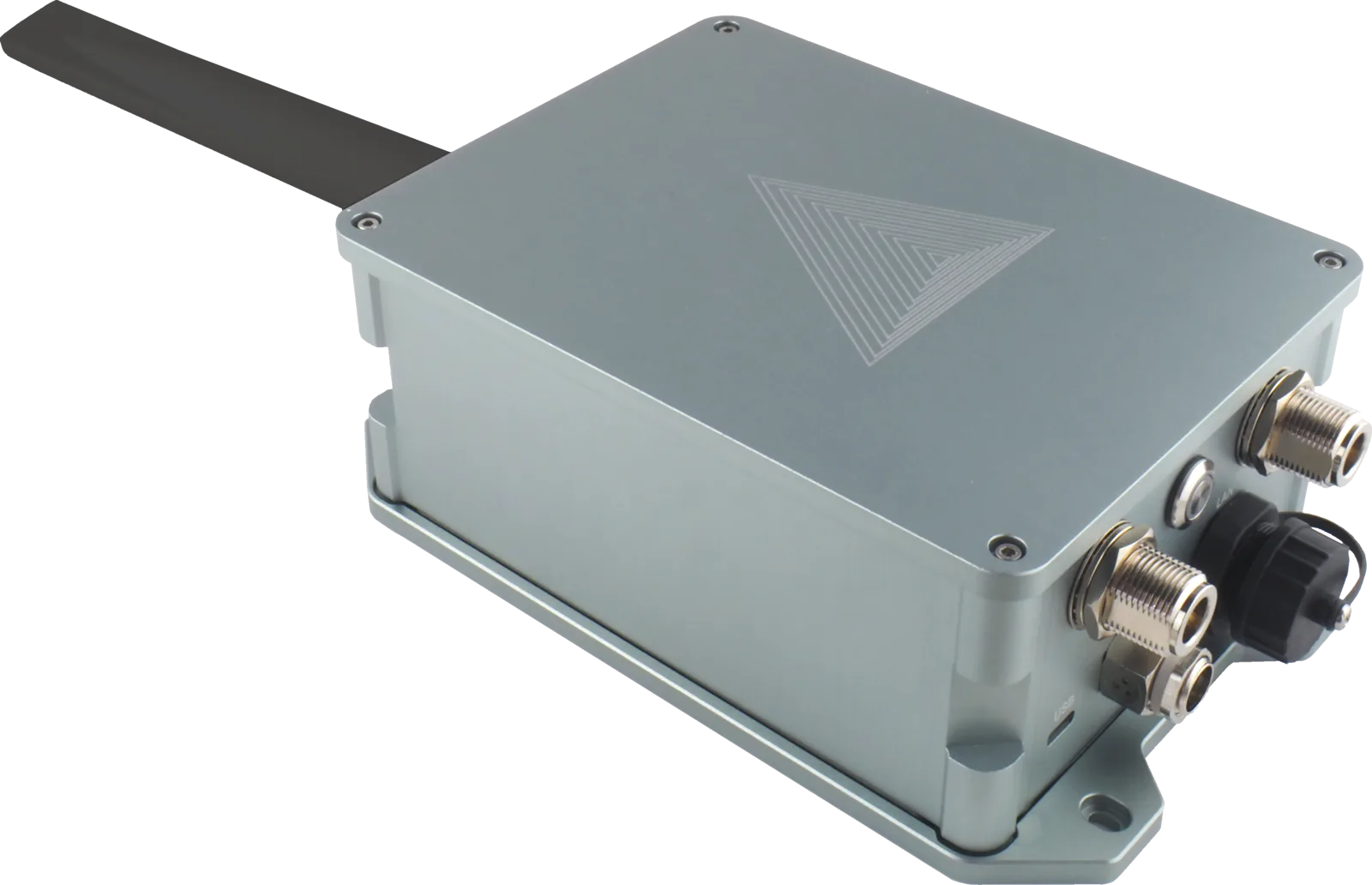
A Raspberry Pi Compute Module 4 or 5 on our own baseboard, in a milled aluminium case. You choose the cards; the board takes care of power, slots and recovery.
- Gets itself out of trouble
A co-processor watches the board. It can reset a hung modem, switch between SIM and eSIM, and power-cycle the compute module, so nobody has to drive out.
- Power from whatever is there
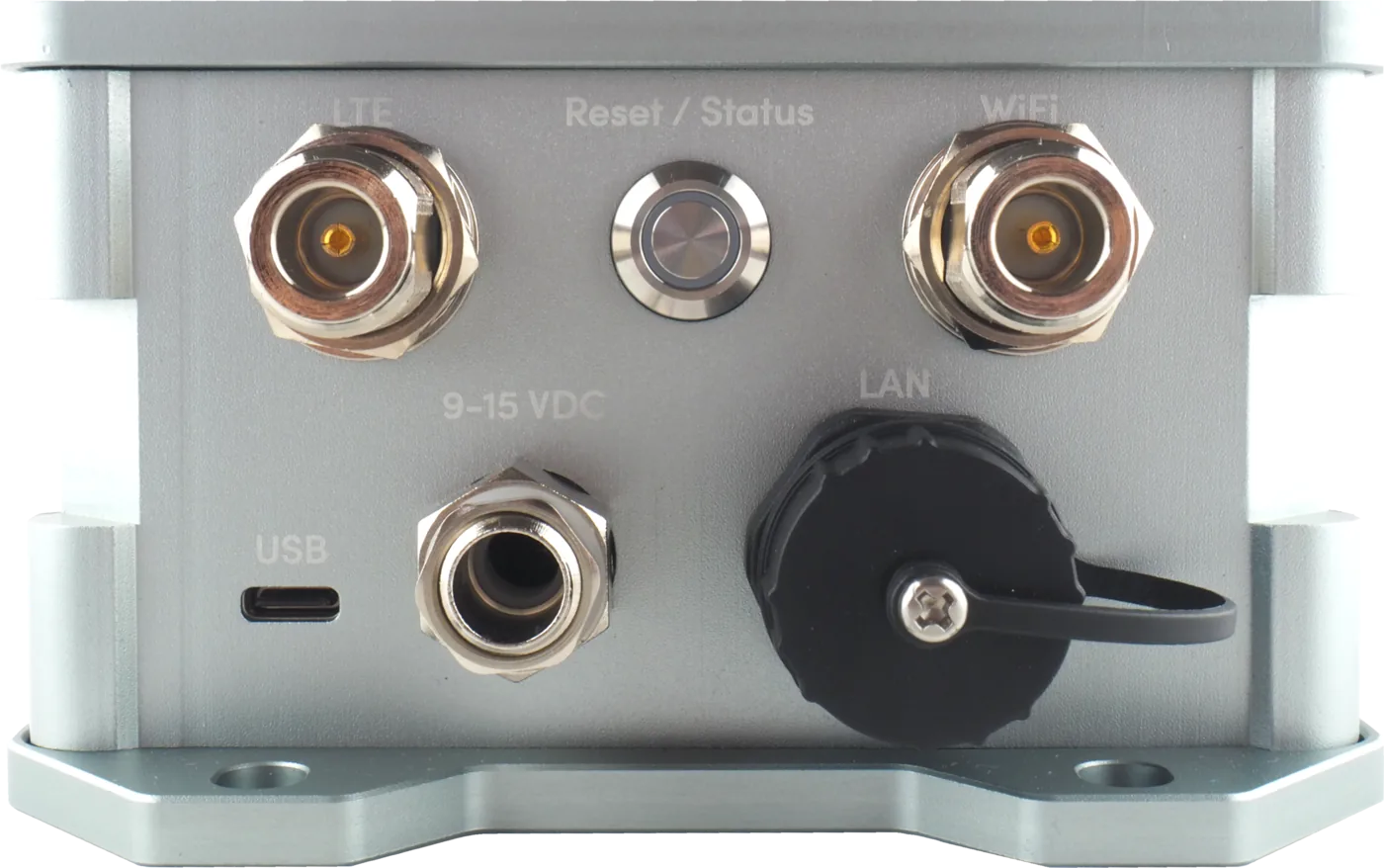
DC from a cabinet supply, PoE+ over the LAN cable, or a USB-C power supply. The board picks the input by itself.
- Keys in hardware
An ATECC608A secure element and a TPM 2.0 on every board.
- Made for the plant room
Milled aluminium, N-type antenna connectors, a sealed LAN socket and a mounting flange.
Expansion cards
Pick the cards, not a different gateway
We build our own Mini PCIe cards for the radios that IoT projects keep asking for. The same box becomes a LoRaWAN gateway, a positioning base or a building controller.
LTE
Quectel, SIMCom, Fibocom and other common modems. SIM and eSIM.
LTE slotLoRa concentrator
A full LoRaWAN gateway radio for meters and sensors kilometres away.
LoRa slotRTK GNSS
u-blox F9P or F9R for centimetre positioning, with an optional Xsens IMU.
Mini PCIeUWB
Ultra-wideband transceivers for indoor positioning and ranging.
Mini PCIeBluetooth
One, two or three nRF52 radios on one card, for many tags at once.
Mini PCIeZigbee, Thread, Matter
A multi-radio that works with Home Assistant.
Mini PCIeIndustrial I/O
Two relays and two MOSFET input detectors to switch loads and read contacts.
Mini PCIeUSB-C hub
Four USB-C ports for serial adapters and other USB devices.
Mini PCIe
The two M.2 slots take standard M-key modules: NVMe SSDs for local data, or an accelerator for running models on site.
tapdo fleet
Run every gateway from one place
Every Quantumlink Gateway runs tapdo OS and signs in to tapdo fleet with a key of its own. From there your team ships apps, rolls out OS updates and looks into any gateway, without visiting a site.
- Apps from one compose file
Save a compose file for a fleet. Every gateway in it pulls the images and starts them.
- OS updates with rollback
Publish a new image to a feed. Each gateway installs it in its spare slot and falls back to the old one if the new one doesn't come up. Pause at any time.
- Logs and remote shell
Read a gateway's logs and open a shell from your terminal.
- Teams and customers
Give each customer or installer their own tenant with its own sign-in and roles. Every change is in the audit log.
# example: the apps for every LoRaWAN gateway
services:
  packet-forwarder:
    image: registry.example.com/lora/forwarder:2.1
    devices:
      - /dev/spidev0.0   # concentrator on the LoRa slot
    restart: unless-stopped
  gateway-bridge:
    image: chirpstack/chirpstack-gateway-bridge:4
restart: unless-stoppedExample values for illustration.
Where it fits
One platform for very different sites
The cards decide what a gateway does. tapdo fleet stays the same for all of them.
Building retrofit
Bring older buildings onto one network: Zigbee, Thread and Bluetooth sensors, relays for actuators, LTE where there is no IT network.
Zigbee, ThreadBluetoothIndustrial I/OLTECar parks and charging
Connect chargers and bay sensors over LTE and LoRa, and switch barriers and lights with the relay card.
LTELoRaIndustrial I/OEnergy and storage sites
Collect data from meters and inverters, keep it on site when the line is down, and update the control software everywhere at once.
LTEIndustrial I/ONVMeLoRaWAN for towns and utilities
Run your own LoRaWAN network for meters, bins and parking sensors, with LTE where there is no fibre.
LoRaLTEPositioning and logistics
Track vehicles, tools and goods: RTK GNSS outside, UWB and Bluetooth inside.
RTK GNSSUWBBluetoothYour own product
Build your device on our board and OS image and get fleet management with it, instead of building a gateway from scratch.
Any cardM.2
Ways to start
Start small, then roll out
- Try it
Pilot
A few gateways at one of your sites, set up together with us.
- Cards chosen for your site
- Your first app on the fleet
- Buy
Gateways + fleet
Buy the gateways you need, with a tapdo fleet plan for the size of your fleet.
- Assembled to your configuration
- Tenants for your customers
- Rent
Gateway as a service
One monthly price per gateway that covers the hardware and tapdo fleet.
- No hardware cost up front
- tapdo fleet included
Plan your first gateways
Tell us which radios you need and where the gateways will hang. We put together a configuration and a quote, and set up your team on tapdo fleet.
- A configuration for your sites
- A quote for gateways and tapdo fleet
- A pilot, set up together with your team
Or email us: quantumlink@tapdo.io
Read the datasheetThank you, your request is on its way
We will get back to you at .